Ok so let's say I'm dynamically adding two UIViews to a UIScrollView in a horizontal layout. I want the second UIView to be places underneath the first UIView (with a padding of 2 pixels). Here's how I did it:
notes
1. myUIScrollView is the name of my UIScrollView
2. myView1 is the name of my first UIView.
3. myView2 is the name of my second UIView.
///
CGRect tempFrame = [myView1 frame]; //get frame/CGRect for myView1
[myUIScrollView addSubview:myView1]; //add myView1 to the UIScrollView
//get the size of myView1, and make the next Y co-ord its height+2.
int nextY = tempFrame.origin.y + myView1.bounds.size.height+2;
tempFrame = [myView2 frame]; //get the frame/CGRect for myView2
myView2.origin.y = nextY; //set the Y co-ord to that of myView1's height+2.
myView2.frame = tempFrame; //apply the frame to myView1.
[myUIScrollView addSubview:myView2]; //add myView2 to the UIScrollView object.
///
I'm sure there's a better way to do this. Somehow?
Showing posts with label ios. Show all posts
Showing posts with label ios. Show all posts
Saturday, June 09, 2012


UINavigationController in XCode 4.2
A lot of tutorials for UINavigationController don't work for XCode 4.2. So...
I found this decent tutorial on how to implement a UINavigationController:
http://www.techotopia.com/index.php/Creating_a_Navigation_based_iOS_5_iPhone_Application_using_TableViews
I found this decent tutorial on how to implement a UINavigationController:
http://www.techotopia.com/index.php/Creating_a_Navigation_based_iOS_5_iPhone_Application_using_TableViews
Friday, April 15, 2011
Hide Status Bar in iPhone
In applicationDidFinishLaunching:
[[UIApplication sharedApplication] setStatusBarHidden:YES];
[[UIApplication sharedApplication] setStatusBarHidden:YES];
GADRequest Test Mode (isTesting)
To set the GADRequest into test mode you are told to set 'isTesting.' This can be done by loading your GADBannerView like so:
GADRequest *r = [[GADRequest alloc] init];
r.testing = YES;
[bannerView_ loadRequest:r];
Apparently you don't need to care about this when you submit you app, since AdMob will never be in test mode when deployed on a real device.
GADRequest *r = [[GADRequest alloc] init];
r.testing = YES;
[bannerView_ loadRequest:r];
Apparently you don't need to care about this when you submit you app, since AdMob will never be in test mode when deployed on a real device.
Sunday, April 10, 2011
Sqlite database not accessible after change of bundle identifier
Noticed the strangest behavior today.
After I changed the bundle identifier in my XCode project, the sqlite database no longer had the tables I'd created before. Changing the bundle identifier back made the tables accessible again. Even from the command line interface they had disappeared.
The way to resolve it was to re-enter the data :\
Not sure why this happened or how it could be easier to migrate the data over yet. I need to investigate this more.
After I changed the bundle identifier in my XCode project, the sqlite database no longer had the tables I'd created before. Changing the bundle identifier back made the tables accessible again. Even from the command line interface they had disappeared.
The way to resolve it was to re-enter the data :\
Not sure why this happened or how it could be easier to migrate the data over yet. I need to investigate this more.
Saturday, April 09, 2011
iPhone force rotate to portrait
[[UIDevice currentDevice] setOrientation:UIInterfaceOrientationPortrait];
//Probably works for iPad too
//Probably works for iPad too
Saturday, February 26, 2011
Interface Builder Send to Back
UI Builder 'send to back' can be done by:
Toolbar->Layout->Send to back
Toolbar->Layout->Send to back
Sunday, February 13, 2011
Change text and action of UIBarButtonItem
To change the text and the action of a UIBarButtonItem is no straightforward thing.
1. In Interface Builder, make sure the UIBarButtonItem is of Identifier: Custom
2. Do the usual hooking up of the button via an IBOutlet.
3. Use this code (where 'myBarButtonItem' is the existing button that has already been hooked up via an IBOutlet, and 'doSomeNewAction' is the new action I wish for the button to perform):
UIBarButtonItem *myNEWBarButtonItem = self.myBarButtonItem;
[myNEWBarButtonItem setTarget:self];
[myNEWBarButtonItem setTitle:@"Do Some New Action"];
[myNEWBarButtonItem setAction:@selector(doSomeNewAction:)];
1. In Interface Builder, make sure the UIBarButtonItem is of Identifier: Custom
2. Do the usual hooking up of the button via an IBOutlet.
3. Use this code (where 'myBarButtonItem' is the existing button that has already been hooked up via an IBOutlet, and 'doSomeNewAction' is the new action I wish for the button to perform):
UIBarButtonItem *myNEWBarButtonItem = self.myBarButtonItem;
[myNEWBarButtonItem setTarget:self];
[myNEWBarButtonItem setTitle:@"Do Some New Action"];
[myNEWBarButtonItem setAction:@selector(doSomeNewAction:)];
Wednesday, February 09, 2011
Toolbar disappears on rotate (ipad/iphone/ios)
In interface viewer, my toolbar was disappearing when I rotated the interface.
To solve it, I had to adjust the 'Autosizing' property inside the 'Toolbar Size' tab.
To solve it, I had to adjust the 'Autosizing' property inside the 'Toolbar Size' tab.
Sunday, February 06, 2011
Attribute libxml2 xpath iphone howto
Attribute libxml2 xpath howto:
Given the xml:
<yournodewithanattribute someattribute="some attribute value"></yournodewithanattribute>
To get the attribute value:
NSString *path = [NSString stringWithFormat:@"http://yourdomain/yourxmlfile.xml"];
NSURL *url = [NSURL URLWithString:path];
NSData *xmlData = [NSData dataWithContentsOfURL:url];
NSString *xPathQuery1;
NSArray *nodes1;
xPathQuery1 = @"//yournodewithanattribute";
nodes1 = (NSArray*)PerformXMLXPathQuery(xmlData, xPathQuery1);
for (NSDictionary *attrNodes1 in nodes1){
for (NSDictionary *nodeAttributeArray in [attrNodes1 objectForKey:@"nodeAttributeArray"]){
NSString *attributeName = [nodeAttributeArray objectForKey:@"attributeName"];
NSString *attributeValue = [nodeAttributeArray objectForKey:@"nodeContent"];
NSLog(@"Attribute Name: %@", attributeName);
NSLog(@"Attribute Value: %@", attributeValue);
}
}
Given the xml:
<yournodewithanattribute someattribute="some attribute value"></yournodewithanattribute>
To get the attribute value:
NSString *path = [NSString stringWithFormat:@"http://yourdomain/yourxmlfile.xml"];
NSURL *url = [NSURL URLWithString:path];
NSData *xmlData = [NSData dataWithContentsOfURL:url];
NSString *xPathQuery1;
NSArray *nodes1;
xPathQuery1 = @"//yournodewithanattribute";
nodes1 = (NSArray*)PerformXMLXPathQuery(xmlData, xPathQuery1);
for (NSDictionary *attrNodes1 in nodes1){
for (NSDictionary *nodeAttributeArray in [attrNodes1 objectForKey:@"nodeAttributeArray"]){
NSString *attributeName = [nodeAttributeArray objectForKey:@"attributeName"];
NSString *attributeValue = [nodeAttributeArray objectForKey:@"nodeContent"];
NSLog(@"Attribute Name: %@", attributeName);
NSLog(@"Attribute Value: %@", attributeValue);
}
}
Saturday, February 05, 2011
loaded the "xxxx" nib but the view outlet was not set
I was tired at night and was getting the error:
loaded the "xxxx" nib but the view outlet was not set
It was simply because I forgot to connect the View. To solve it:
1. Open the nib in "Interface Builder"
2. Right click on "File's Owner"
3. Connect the 'view' outlet to the respective view.
4. Important -> Save the interface.
It should work now :)
loaded the "xxxx" nib but the view outlet was not set
It was simply because I forgot to connect the View. To solve it:
1. Open the nib in "Interface Builder"
2. Right click on "File's Owner"
3. Connect the 'view' outlet to the respective view.
4. Important -> Save the interface.
It should work now :)
Sunday, January 30, 2011
gcc-4.2 failed with exit code 1
When compiling an iPhone app. I got gcc-4.2 failed with exit code 1
This was a strange one. Which I still don't fully understand.
It was happening because I had a duplicate global variable in two different .m files.
This was found by right clicking on the error message and selecting "Open These Latest Results as Transcript Text File." This revealed something like:
"ld: duplicate symbol _mouseSwiped"
Removing the duplicate symbol solved it for me.
Although I don't think I am properly understanding how Objective C works yet.
This was a strange one. Which I still don't fully understand.
It was happening because I had a duplicate global variable in two different .m files.
This was found by right clicking on the error message and selecting "Open These Latest Results as Transcript Text File." This revealed something like:
"ld: duplicate symbol _mouseSwiped"
Removing the duplicate symbol solved it for me.
Although I don't think I am properly understanding how Objective C works yet.
Saturday, January 29, 2011
"does not have an outlet named" problem in XCode/Interface Builder
I was getting the error "Blah blah does not have an outlet named blahblah" in Interface Builder.
After clicking on 'reload all class files'
I guess the problem was caused because I moved my user directory from one drive to another.
To solve it, I clicked on "File -> Read Class Files" then located the correct view controller class that I was trying to link to.
After clicking on 'reload all class files'
I guess the problem was caused because I moved my user directory from one drive to another.
To solve it, I clicked on "File -> Read Class Files" then located the correct view controller class that I was trying to link to.
Wednesday, January 12, 2011
Loop alphabet objective c
Objective C makes it easy:
NSMutableArray *alphabetArray;
alphabetArray = [[NSMutableArray alloc] init];
for(char c = 'A'; c <= 'Z'; c++)
{
[alphabetArray addObject:[NSString stringWithFormat:@"%c", c]];
}
Or if you want to do lower case:
NSMutableArray *alphabetArray;
alphabetArray = [[NSMutableArray alloc] init];
for(char c = 'a'; c <= 'z'; c++)
{
[alphabetArray addObject:[NSString stringWithFormat:@"%c", c]];
}
NSMutableArray *alphabetArray;
alphabetArray = [[NSMutableArray alloc] init];
for(char c = 'A'; c <= 'Z'; c++)
{
[alphabetArray addObject:[NSString stringWithFormat:@"%c", c]];
}
Or if you want to do lower case:
NSMutableArray *alphabetArray;
alphabetArray = [[NSMutableArray alloc] init];
for(char c = 'a'; c <= 'z'; c++)
{
[alphabetArray addObject:[NSString stringWithFormat:@"%c", c]];
}
Tuesday, January 11, 2011
Saturday, January 08, 2011
App has exited with status 5 (After upgrading XCode)
After upgrading my XCode to a newer version, I tried to compile and run some iPad code that was previously working... but after the upgrade I was getting the message "App has exited with status 5"
I solved this by setting the "Installation Directory" which had somehow become corrupted. I set it to "@executable_path/../Frameworks" and then all was fine. As illustrated:

I solved this by setting the "Installation Directory" which had somehow become corrupted. I set it to "@executable_path/../Frameworks" and then all was fine. As illustrated:

Thursday, January 06, 2011
setfont is deprecated iPhone
Yes indeed it is.
Now this:
//cell.font=[UIFont fontWithName:@"Trebuchet MS" size:20.0];
Should become this instead:
cell.textLabel.font = [UIFont fontWithName:@"Trebuchet MS" size:20.0];
Now this:
//cell.font=[UIFont fontWithName:@"Trebuchet MS" size:20.0];
Should become this instead:
cell.textLabel.font = [UIFont fontWithName:@"Trebuchet MS" size:20.0];
libxml2 ios example. libxml2 in xcode
This is a bit of a messy post, but it involves getting apps written using libxml2 to compile in Xcode.
1. Firstly, you'll need the libxml2 framework for Snow Leopard (and annoyingly, gcc to compile it).
You can download the latest libxml2 (get the .tar.gz) from here: ftp://xmlsoft.org/libxml2
Extract the files. Then do a
sudo ./configure
sudo make install
Boom. You're getting there. You can now open your Xcode environment.
2. When you first try to compile, you might get something like "libxml2 _xmlXPathNewContext referenced from" as an error.
This is because the library is not linked in the project yet.
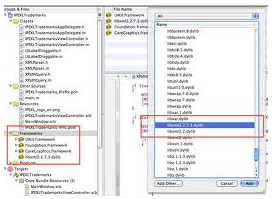
You can link it by right clicking on the "Frameworks" folder, then "Add" -> "Existing Framework"
If libxml2 is installed on your system, you should be able to see it in the drop down box. As in the following screenshot:
3. The other thing that must be done. Is to put the string "/usr/include/libxml2/" in your search paths for your project. This is found by left clicking on your main project. Then clicking the blue 'info' button, followed by the 'build' tab.

I hope this helps someone save hours of frustration and searching like I did.
1. Firstly, you'll need the libxml2 framework for Snow Leopard (and annoyingly, gcc to compile it).
You can download the latest libxml2 (get the .tar.gz) from here: ftp://xmlsoft.org/libxml2
Extract the files. Then do a
sudo ./configure
sudo make install
Boom. You're getting there. You can now open your Xcode environment.
2. When you first try to compile, you might get something like "libxml2 _xmlXPathNewContext referenced from" as an error.
This is because the library is not linked in the project yet.
You can link it by right clicking on the "Frameworks" folder, then "Add" -> "Existing Framework"
If libxml2 is installed on your system, you should be able to see it in the drop down box. As in the following screenshot:

3. The other thing that must be done. Is to put the string "/usr/include/libxml2/" in your search paths for your project. This is found by left clicking on your main project. Then clicking the blue 'info' button, followed by the 'build' tab.

I hope this helps someone save hours of frustration and searching like I did.
Subscribe to:
Posts (Atom)